
How to add CkEditor in Django
Published May 14, 2024, 5:36 a.m. by cloudblog
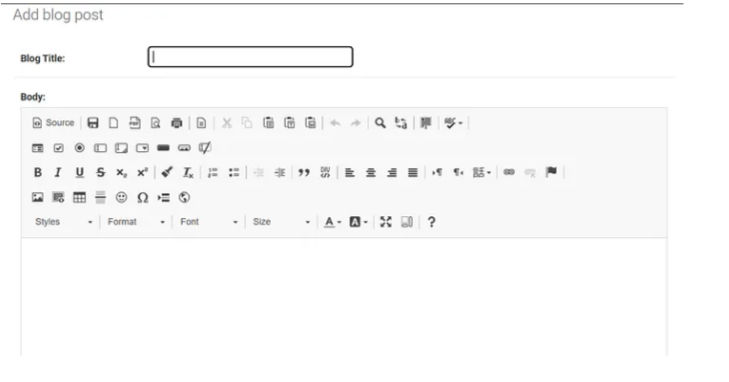
Ckeditor, a WYSIWYG rich text editor allows users to write content directly inside web pages or online applications. A Django WYSIWYG editor built upon CKEditor, you can use it as a standalone widget, or use the provided RichTextField or RichTextUploadingField on your models.
Installation and Configuration.
Install django-ckeditor.
pip install django-ckeditor
Note: In this tutorial, I am using django==3.2.15 and django-ckeditor==6.0.0
Please make sure you use the same versions. I tried using django-ckeditor==6.3.2 but RichTextUploadingField field was not appearing in the admin panel. So please follow the same steps and versions.
Add ckeditor in INSTALLED_APPS in your settings.py
# settings.py
INSTALLED_APPS = [
    ...
    'ckeditor',
]
Then set STATIC_ROOT in your settings.py file.
# settings.py
# if you are using pathlib Path
STATIC_ROOT = BASE_DIR / 'static'#if you are using os
STATIC_ROOT = os.path.join(BASE_DIR, 'static')
Then run python manage.py collectstatic command. This command will copy the django-ckeditor static and media resources into the directory given by the STATIC_ROOT.
After running this command you will get this message in the terminal and also a folder named static/ckeditor
1383 static files copied to ‘your path’.
Also, add media file settings in the settings.py file.
# settings.py
MEDIA_URL = '/media/'
MEDIA_ROOT = BASE_DIR / 'media'
Then set some ckeditor settings in your settings file
# settings.py
# CKEditor Settings
CKEDITOR_UPLOAD_PATH = 'uploads/'
CKEDITOR_IMAGE_BACKEND = "pillow"
CKEDITOR_JQUERY_URL = '//ajax.googleapis.com/ajax/libs/jquery/2.1.1/jquery.min.js' CKEDITOR_CONFIGS = {
    'default':
        {
            'toolbar': 'full',
            'width': 'auto',
            'extraPlugins': ','.join([
                'codesnippet',
            ]),
        },
}
Main urls.py
Go to main_project/urls.py and add the following URL.
#urls.py
from django.contrib import admin
from django.urls import path, include
from django.conf.urls.static import static
from django.conf import settingsurlpatterns = [
    .....
    path('admin/', admin.site.urls),
    path('ckeditor/', include('ckeditor_uploader.urls')),
]urlpatterns += static(settings.MEDIA_URL, document_root=settings.MEDIA_ROOT)if settings.DEBUG:
    urlpatterns+=static(settings.STATIC_URL,document_root=settings.STATIC_ROOT)
    urlpatterns += static(settings.MEDIA_URL, document_root=settings.MEDIA_ROOT)
Models.py
We are using RichTextUploadingField for file support.
# models.py
from django.db import models
from django.utils.translation import gettext_lazy as _
from ckeditor_uploader.fields import RichTextUploadingFieldclass BlogPost(models.Model):
    title = models.CharField(
        _("Blog Title"), max_length=250,
        null=False, blank=False
    )
    body = RichTextUploadingField()    def __str__(self):
        return self.title
Then run migrations.
Register your models in admin.py
# admin.py
from django.contrib import admin
from .models import BlogPost
admin.site.register(BlogPost)
Then open the admin panel. You will see Ckeditor.
Similar posts
Connecting to OCI Linux Instance Using SSH
Connecting to a OCI Linux Instance Using OpenSSH
0 comments
There are no comments.